| Impact Weight (1-100) | 90 |
|---|---|
| Security Level | Public Sales Leadership Staff Leadership Staff Sales Admin |
| Evergreen Weight (1-100) | 90 |
| Status | Active |
| Date Created | Jun 1, 2026 |
| Last Updated | Jun 2, 2026 |
| Channel | Dealer Empower X |
Coaching the customer will result in a failed call. Do not instruct or prompt customers on how to answer. All responses must be complete, clear, and in the customer's own words.
Why It’s Required
The Empower Installer Welcome Call is required before you can schedule a site survey. The call is designed protect you and protect us. It creates a documented record that protects the sales people — if a customer ever claims something was promised or misrepresented, the recorded call is proof that everything was reviewed and confirmed. It protects your reputation, your commissions, and your livelihood. It also protects Empower as the installer from liability and disputes. Why we require this call:
- “Do It Right” is one of our core values that we strive to live by. We’re serious about being a force for good in the home services industry.
- Reduce the number and severity of escalations/clawbacks. Alignment creates clarity and clarity creates trust.
- Improve your cycle times. Our data shows deals with the
Ways to Clear the Call
- CallPilot
- Live Call (Only used if the Callpilot survey did not work)
- CallPilot
- CallPilot
CallPilot is Empower's preferred method for clearing the welcome call. CallPilot is a video verification call you start from Jobflo after the prospect becomes a Jobflo customer. Watch this quick 2 minute rundown on how to create your customer’s CallPilot link.
Steps in Jobflo
- Convert the prospect to a Jobflo customer.
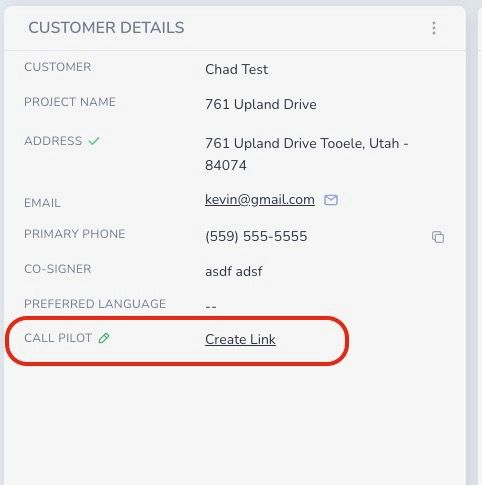
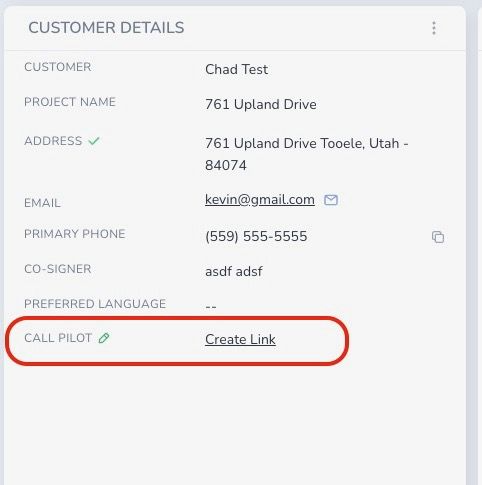
- Open the customer page.
- Select Create link to generate the CallPilot link. Wait 10 seconds.
- Select which version of the call you need (default unless you’re doing an HDM or Lightreach account)
- Select View link to open CallPilot.
- In CallPilot, select Start from browser and allow microphone and camera.
- Customer completes the call. They will confirm name, installation address, preferred phone, preferred email, HOA, grid connection understanding, any unpermitted work, and that only the written agreement is binding.
- Select Begin upload and wait for the upload to finish before closing the window.
- Go back to Jobflo and hit refresh.
After upload
- Jobflo adds a Note titled "CallPilot Survey Results" with each question, the selected response, and any typed inputs.
- The View results button downloads the recording to your device.
- Live Call (Backup Option Only)
- Live Call (Backup Option Only)
If you are having technical difficulties or unstable internet with CallPilot, you may conduct a call with the customer and Empower. This can only be done if the Callpilot is not working. The three way call can Steps:
- Call your customer. They must use their phone number on file with us to complete the three-way call.
Call Empower using our welcome call phone tree option.
✔️ Empower Installer Welcome Call: (800) 306-6953
Option: 4
M-F: 8 am - 7 pm PST
Sa: 9 am - 4 pm PST- The Empower agent will send a six digit SMS code to the customer’s phone on file. The customer will be required to repeat that six digit code back to our agent before proceeding with the call.
- The agent completes the script and the call requirement will be cleared if it passes.
Script
Use this script to complete the required Empower Installer Welcome Call before scheduling a site survey. Each question is tagged with where it applies:
- Welcome to Empower Home Services! This call is to review your project details and will be audio and video recorded — do we have your permission to proceed?
- Can you confirm you can read and understand English, that you fully understand the terms of your agreement, and that your representative communicated with you in English throughout the process?
- Please confirm your full name as it appears on your agreement.
- Is the contact information we have for you correct? {{first_name}} {{last_name}} {{address}} {{phone_number}} {{email}}
- Can you confirm the address where work will be performed?
- Are you authorized to enter into this agreement on behalf of all owners of this property?
- Do you understand a drone will be used for your site assessment, that aerial imagery will be captured and retained as part of your permanent project record, and shared with our project partners for quality assurance?
- Our records show {{representative_name}} assisted you — is that correct?
- Did you personally sign all project agreements and receive copies via email?
- Does your property belong to an HOA?
- Did you have all the time you needed to review your agreement and proposal before signing, and was moving forward your own decision?
- Does your written agreement include everything discussed and promised, and do you understand anything said after today's call won't become part of your agreement unless Empower Home Services puts it in writing?
- Thank you for choosing Empower Home Services! Please tap "Begin Upload" and wait for it to finish before closing.